No products in the cart.

Best WordPress Maintenance Services: How to Choose the Right Provider
The best WordPress maintenance services combine tested updates, off-site backups, active security monitoring, clear reporting, and responsive human support, at a price that fits your site. No single provider is best for everyone. The right choice depends on how complex your site is, how much downtime would cost you, and how much support you need.
This guide explains what separates good providers from average ones, how the main provider types compare, and which questions to ask before you pay for a plan.
What Makes the Best WordPress Maintenance Services?
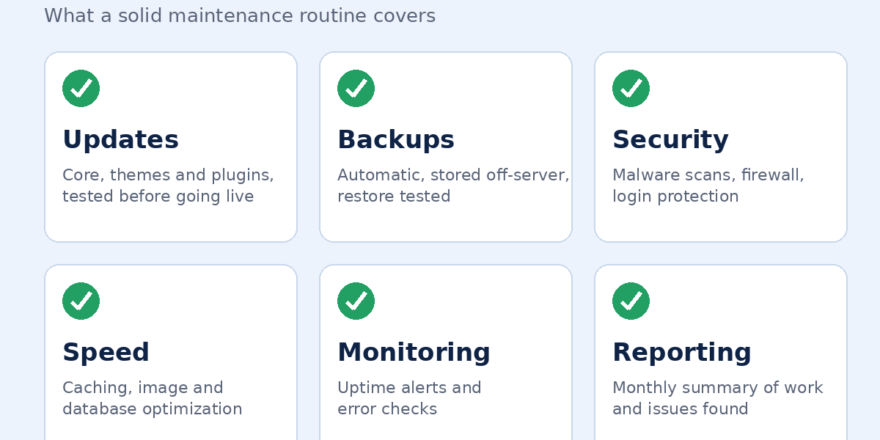
The best WordPress maintenance services share the same traits, whatever the price or brand name:
- A clear written scope. You know what is covered, what costs extra, and what is excluded.
- Safe update practices. Updates are backed up first and, for important sites, tested on a staging copy.
- Reliable backups. Copies are stored off your hosting server, with a defined retention period and a tested restore process.
- Active security. Scanning, firewall setup, login protection, and a defined plan if the site is compromised.
- Monitoring. Uptime alerts and performance checks that catch problems early.
- Plain-language reporting. A regular summary of what was done and what needs attention.
- Accessible support. Named contacts and stated response times.
If a provider cannot explain these clearly, keep looking.
Evaluation Checklist: What Good Looks Like
| Criteria | What good looks like | Red flag |
|---|---|---|
| Scope | Written list of included tasks | “We handle everything” with no detail |
| Backups | Off-site, scheduled, restore tested | Relies only on your host’s backups |
| Updates | Backup first, staging for key sites | Bulk updates straight to the live site |
| Security | Scanning plus a defined hack response | Cleanup billed at unclear rates |
| Reporting | Regular, readable reports | No reports or only automated noise |
| Support | Stated response times | No contact method beyond a form |
| Contract | Clear terms, easy cancellation | Long lock-in with vague exit rules |
What Are the Main Types of WordPress Maintenance Providers?
Each type of provider suits a different situation.
| Provider type | Best for | Strengths | Limitations |
|---|---|---|---|
| Freelancer | Small sites on a budget | Personal service, flexible | Limited cover during absences |
| Maintenance specialist company | Business sites needing a defined WordPress maintenance plan | Set processes, tiered plans | Less customization |
| Full-service agency | Sites also needing design, development, or SEO | One team for everything | Usually higher cost |
| Managed WordPress host | Sites wanting basic upkeep bundled with hosting | Convenient, built into hosting | Coverage varies and is often limited |
A managed host may handle some updates and backups, but it rarely includes support for broken layouts, plugin conflicts, or custom code. Check what is actually covered.
Which Option Is Best for Your Type of Site?
Brochure or Small Business Site
A basic plan with updates, backups, security scanning, and uptime monitoring is usually enough. A reliable freelancer or a standard tier from a specialist company can work well.
WooCommerce or Online Store
Downtime directly costs sales, so prioritize frequent backups, staging tests before updates, checkout testing, and fast support. This is where the best WordPress maintenance services justify a higher price.
Membership or Booking Site
These sites depend on logins, payments, and plugin compatibility. Look for providers with experience handling complex plugin stacks.
Content-Heavy Blog or Publisher
Speed, database health, and plugin cleanup matter most. Ask whether performance optimization is part of the plan or sold separately.
What Should You Ask Before Hiring?
Use these questions to compare any shortlisted provider:
- What exactly is included in each plan, and what is billed separately?
- Where are backups stored, how often do they run, and how quickly can you restore?
- Do you test updates on staging before applying them?
- What happens if the site is hacked? Is cleanup included?
- How do you handle a plugin update that breaks the site?
- What is your typical response time for urgent issues?
- How do you access my site, and how are credentials protected?
- What are the contract terms, and do I keep full ownership of my site and data?
Clear, specific answers matter more than polished sales pages.
Red Flags to Avoid
- Promises of “100% security” or “guaranteed rankings.” No provider can guarantee either.
- Pricing with no written scope
- No mention of backups or restore testing
- Pressure to sign long contracts quickly
- Refusal to explain how they handle updates
- Requests for administrator access without any security process
How Much Do the Best WordPress Maintenance Services Cost?
Prices vary widely, so avoid choosing on the monthly fee alone. Costs depend on:
- Site size and plugin complexity
- Whether the site takes payments or bookings
- Backup frequency and security level
- Support hours and response times
- Whether malware cleanup and emergency fixes are included
A cheaper plan that excludes support and recovery can cost more after a single incident. Compare scope line by line.
How Do You Compare Providers Fairly?
Pick three providers and score each one from 1 to 5 on scope clarity, backup process, update safety, security approach, communication, and contract terms. Weigh the criteria that matter most for your site. A store should weight backups and response time heavily, while a simple brochure site can weight price more.
Independent write-ups can help with this step. This WPDevShed review shows how a provider can be assessed on services and approach before you commit.
Can You Handle WordPress Website Maintenance Yourself?
On a simple site, yes. A monthly routine covers backups, plugin, theme, and core updates, front-end checks, user account reviews, and removal of unused plugins. The WordPress project’s security resources explain why keeping software current matters.
Professional help is the better choice when downtime would cost you money, when the site has custom code, or when you do not have the time.
How Does Maintenance Fit with SEO and Design?
Maintenance protects the technical foundation, while SEO builds visibility on top of it. If you also want search growth, read about WordPress SEO services and use this WordPress SEO agency guide to evaluate agencies.
If maintenance exposes an outdated theme or a poor mobile layout, you may need to find WordPress website designers near you.
Frequently Asked Questions
What are the best WordPress maintenance services?
The best WordPress maintenance services are those with a clear scope, tested off-site backups, safe update practices, active security monitoring, regular reporting, and responsive support. The right provider depends on your site type and budget.
How do I choose a WordPress maintenance provider?
Shortlist three providers, ask the same set of questions about backups, updates, security, support, and contract terms, and compare their written scopes rather than headline prices.
What should a WordPress maintenance plan include?
At minimum: core, theme, and plugin updates, automatic off-site backups, security scanning, uptime monitoring, and some support. Performance work and hack cleanup may cost extra.
How much should I pay for WordPress maintenance?
It depends on your site’s complexity and the support level. A simple site needs less than a busy online store. Always compare what is included.
Is managed WordPress hosting the same as maintenance?
No. Hosting provides the server. Maintenance is ongoing work on the site itself. Some managed hosts include a few tasks, but coverage varies.
How often should WordPress be maintained?
Backups and monitoring should run daily or continuously. Updates are typically applied weekly or monthly, with urgent security fixes handled sooner.
Do WordPress maintenance services include SEO?
Usually not. Maintenance covers technical health, while SEO covers keyword research, content, and link building. Some providers sell both separately.
What happens if my site is hacked?
It depends on the plan. Some include cleanup and restoration, while others charge extra. Confirm this before signing up.
Conclusion
The best WordPress maintenance services are defined by substance, not branding: a written scope, tested backups, careful updates, real security monitoring, and support you can reach. Match those traits to your site’s needs, ask the same questions of each provider, and compare scope before price.
A well-chosen plan prevents most technical problems and keeps your site secure, fast, and available.
Post Views: 8