No products in the cart.

WordPress Maintenance Services: What They Include, What They Cost, and How to Choose
WordPress maintenance services are ongoing technical care for your website. A provider handles core, theme, and plugin updates, backups, security monitoring, uptime checks, performance tuning, and fixes, so your site stays secure, fast, and working properly without you managing it day to day.
If you run a business site, a store, or a content-heavy blog, maintenance is what keeps small technical problems from becoming outages, hacked pages, or lost sales.
What Are WordPress Maintenance Services?
WordPress is not a “set it and forget it” platform. The core software, themes, and plugins all release updates regularly, and each one needs to be tested, applied, and monitored.
WordPress maintenance services bundle this work into a recurring plan, usually monthly. Instead of fixing problems after they happen, a provider prevents many of them and responds quickly to the rest.
Why Does WordPress Website Maintenance Matter?
Outdated software is one of the most common reasons WordPress sites run into trouble. The WordPress project publishes security information and release practices because vulnerabilities are found and patched over time, and a site that skips updates stays exposed.
Regular maintenance helps you:
- Reduce the risk of security issues caused by outdated plugins or themes
- Recover quickly if something breaks, thanks to tested backups
- Avoid compatibility conflicts after updates
- Keep pages loading at a reasonable speed
- Catch downtime or errors before customers report them
- Free your own time for running the business
What Is Included in WordPress Maintenance Services?
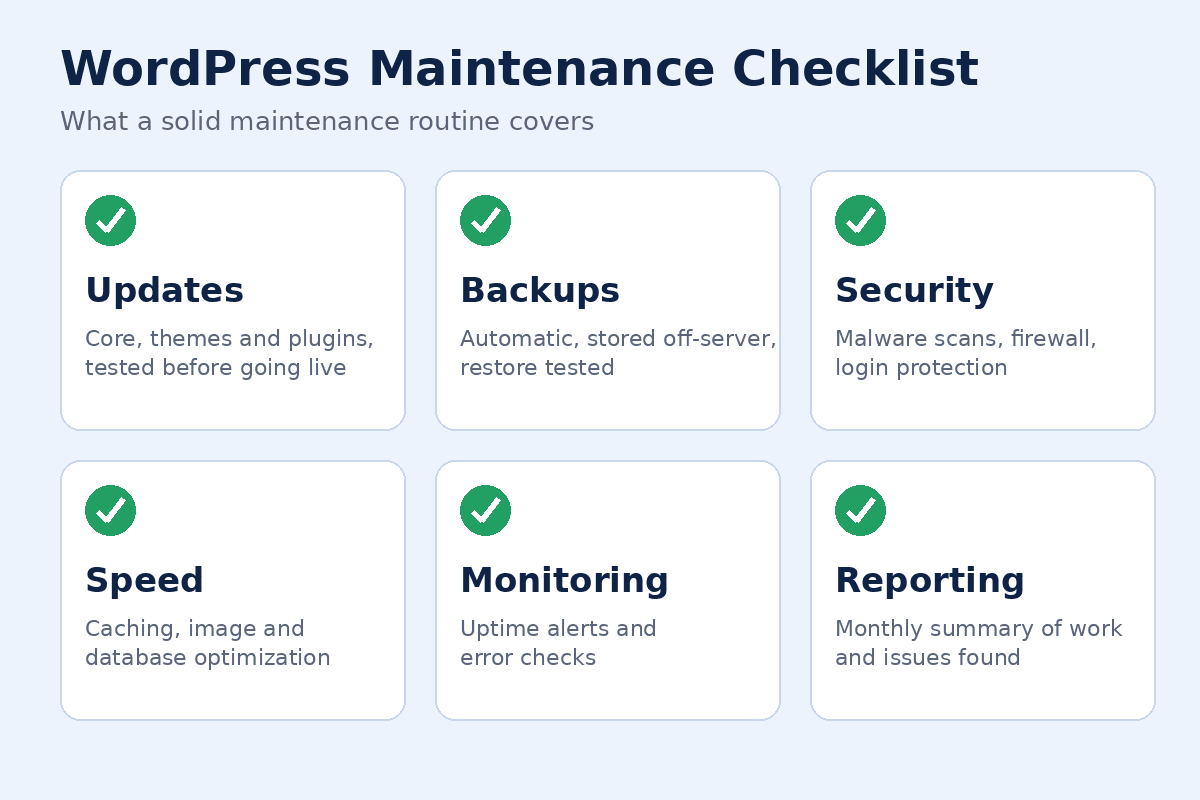
Scope varies by provider, so always check the details. A solid plan usually covers the following.
Updates
Core WordPress, themes, and plugins are updated on a schedule. Good providers test updates on a staging copy first for important sites, because an update can occasionally conflict with other plugins or custom code.
Backups
Automatic backups stored off your hosting server, ideally with a clear retention period and a tested restore process. A backup you have never restored is only a hope, not a plan.
Security Monitoring
This typically includes malware scanning, firewall configuration, login protection, and user account reviews. Some plans include cleanup if the site is compromised, while others charge separately.
Uptime and Performance Monitoring
Monitoring alerts the provider if your site goes down. Performance work may include image optimization, caching configuration, database cleanup, and plugin audits.
Support and Small Fixes
Many plans include a set number of support hours or tasks each month, such as fixing a broken form, editing a page, or troubleshooting an error.
Reporting
A short monthly report should show what was updated, what was found, and what needs attention.
Typical Plan Tiers Compared
Providers package services differently, but plans often follow this pattern. Treat it as a general guide, not a fixed standard.
| Feature | Basic | Standard | Advanced |
|---|---|---|---|
| Core, theme, and plugin updates | Yes | Yes | Yes |
| Backups | Yes | Yes | Yes, often more frequent |
| Security scanning | Basic | Yes | Yes, with active response |
| Uptime monitoring | Sometimes | Yes | Yes |
| Performance optimization | No | Limited | Yes |
| Support hours | None or few | Some | More, with priority response |
| Staging tests before updates | Rarely | Sometimes | Usually |
How Much Do WordPress Maintenance Services Cost?
Pricing varies widely based on the provider, the size and complexity of your site, and how much support is included. A simple brochure site needs far less attention than a WooCommerce store with many plugins and constant orders.
Factors that influence cost:
- Number and complexity of plugins and custom features
- Whether the site sells products or takes bookings
- Backup frequency and security level
- Included support hours and response times
- Whether malware cleanup and emergency fixes are covered
Ask for a written scope and compare what is included, not just the monthly figure. A cheaper plan that excludes support and recovery can cost more when something goes wrong.
Can You Maintain WordPress Yourself?
Yes, if the site is simple and you are comfortable with the dashboard. A basic routine looks like this:
- Back up the site before changing anything.
- Update plugins, then themes, then WordPress core.
- Check the front end, forms, and checkout (if any) after updating.
- Review user accounts and remove anyone who no longer needs access.
- Delete unused plugins and themes.
- Check that backups are running and can be restored.
Doing this monthly is realistic for a small site. Professional services make more sense when downtime would cost you money, when the site has custom code, or when you simply do not have the time.
How Do You Choose a WordPress Maintenance Provider?
Look for clarity and accountability rather than big promises.
- A defined scope. You should know exactly what is included and what costs extra.
- Backup and restore details. Where are backups stored, how often, and how fast can they restore?
- A staging process. Ask whether updates are tested before going live.
- Security approach. What happens if the site is hacked?
- Communication. Look for response times, reports, and a named contact.
- Access practices. They should use secure methods for logins and limit permissions.
- No lock-in surprises. Check contract length, cancellation terms, and whether you keep ownership of your site and data.
Reading independent reviews helps. For example, this WPDevShed review shows how a provider can be evaluated on its services and approach before you commit.
How Does Maintenance Connect to SEO and Design?
A slow, broken, or insecure site can undermine your search visibility and user trust. Maintenance protects the foundation, while SEO builds on top of it. If you are also looking at search performance, it helps to understand WordPress SEO services and how they differ from technical upkeep. When you are choosing an agency for broader work, this WordPress SEO agency guide explains what to look for.
If maintenance reveals deeper design or development problems, such as an outdated theme or a layout that does not work on mobile, you may need to find WordPress website designers near you.
Common WordPress Maintenance Mistakes
- Updating everything at once without a backup. If something breaks, you have no easy way back.
- Keeping unused plugins installed. Inactive plugins can still be a security risk.
- Relying only on the host’s backups. Keep an independent copy as well.
- Ignoring abandoned plugins. If a plugin is no longer maintained, plan a replacement.
- Never testing a restore. Confirm your backups actually work.
- Paying for a plan without checking the scope. “Maintenance” can mean very different things.
Frequently Asked Questions
What do WordPress maintenance services include?
Most plans include core, theme, and plugin updates, backups, security monitoring, uptime checks, and some level of support. Performance optimization and malware cleanup are often included only in higher tiers.
How often should WordPress be maintained?
Backups and security monitoring should run continuously or daily. Updates are typically applied weekly or monthly, with urgent security updates handled sooner.
How much do WordPress maintenance services cost?
It depends on site complexity, the level of support, and the provider. Compare the written scope of each plan rather than price alone.
Is WordPress maintenance really necessary?
Yes, for any site that matters to your business. Without updates, backups, and monitoring, the risk of security problems, conflicts, and downtime increases over time.
What is the difference between WordPress hosting and maintenance?
Hosting provides the server your site runs on. Maintenance is the ongoing work on the site itself, such as updates, security, and fixes. Some managed hosts include a few maintenance tasks, but coverage varies, so check what is actually handled.
Can maintenance improve my site speed?
It can. Cleaning up plugins, optimizing images, configuring caching, and tidying the database often improve load times, though results depend on the site.
Do WordPress maintenance services include SEO?
Usually not. Maintenance focuses on technical health, while SEO covers keyword research, content, and link building. Some providers offer both as separate services.
What happens if my site is hacked?
It depends on your plan. Some providers include cleanup and restoration, while others charge extra. Confirm this before you sign up.
Conclusion
WordPress maintenance services keep your site updated, backed up, secure, and running smoothly through regular technical care. You can handle the basics yourself on a small site, but a professional plan makes sense when uptime, security, or time is at stake.
Whichever route you choose, focus on a clear scope, tested backups, and reliable communication. Those matter more than any single feature on a price list.
Rank Math score notes: The focus keyword appears in the SEO title (at the start), meta description, slug, first sentence, several H2/H3 headings, and the conclusion. Once you add the images with the alt text above and the Table of Contents block, the main checks should be green. If Rank Math flags keyword density, add one or two natural mentions of the exact phrase rather than forcing it.
Post Views: 4